

One click from customs declaration to CMR
CMR Extract is a Google Chrome extension. With the customs declaration screen open, you press “CMR Yaz”; the extension reads the declaration, creates the CMR in your CMRyaz account and gives you its link and QR code.
- No retyping
- Saved to your account
- Link and QR ready
What it does
Built for customs brokers and exporters: it produces the CMR for a shipment whose declaration is ready, without typing it by hand.
- No retyping
- Sender, consignee, description of goods, HS code, number of packages, gross and net weight, plates and invoice details are carried from the declaration to the CMR.
- In your account, numbered
- The CMR is created in your CMRyaz account with its own number. Open and edit it from your list, download the PDF and print it.
- Link and QR code
- The result screen shows the CMR number, its link and QR code. Copy the link to share it or download the QR code.
- No guessing
- Anything not found on the declaration is never made up; the field is left empty and marked for you to check.
- Reads only when you ask
- The extension reads the declaration in the open tab only when you press “CMR Yaz”. Passwords, cookies, browsing history and other pages are not read.
How it works
The extension works on the Turkish customs declaration screen and its interface is in Turkish. Setting it up takes a few minutes.
- 1Install the extension
On the CMR Extract page in the Chrome Web Store, click “Add to Chrome”.
- 2Sign in
Click the extension icon, choose whether the computer is personal or a shared data-room computer, and sign in with your CMRyaz email and password. Your licence is checked against your account.
- 3Press “CMR Yaz”
Open the extension while the customs declaration screen is open in Chrome. Once the page is recognised as a declaration, the “CMR Yaz” button becomes active.
- 4Check and share
The CMR is ready in seconds. Use “CMR’yi Aç” (open CMR) to check the details, then copy the link or download the QR code.
The extension’s screens
Screenshots of the extension itself; its interface is in Turkish.
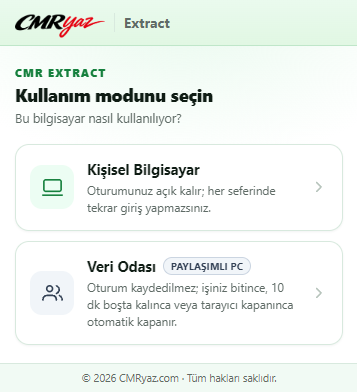
1Usage mode: personal computer or data room 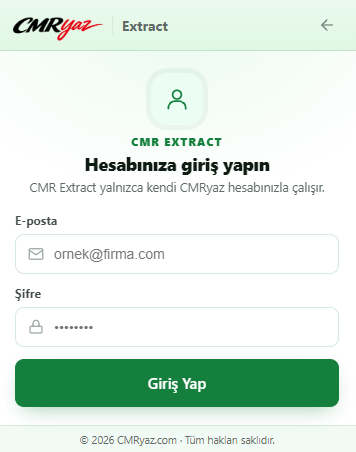
2Sign in with your CMRyaz account 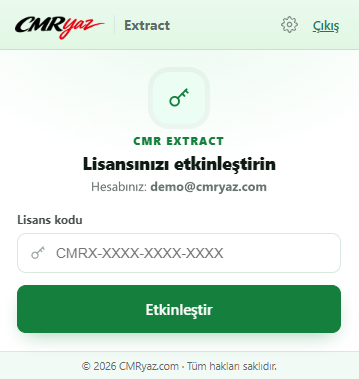
3Licence activation
What is read from the declaration
The extension finds each box by its number and heading and writes the value into the matching CMR field.
| Declaration box | On the CMR |
|---|---|
| 2 · Consignor / exporter | Sender: name, address, city/country, tax number |
| 8 · Consignee, 17 · Country of destination | Consignee |
| 31 · Packages and description of goods | Description of goods, number of packages and packing |
| 33 · Commodity code | HS code (GTIP) |
| 35 · Gross mass, 38 · Net mass | Gross and net weight |
| 18 and 21 · Identity of means of transport | Truck and trailer plates |
| 27 · Place of loading | Place of loading |
| 44 · Additional information (invoice) | Invoice number and date |
| 54 · Place and date | CMR date |
Price and licence
Installing the extension is free; creating CMRs needs a CMR Extract licence and an active Premium membership.
$29.99one-time payment
Charged in Turkish lira: 1.000 TL
- Permanent licence
- The licence is bought once and assigned to your CMRyaz account permanently.
- Works with Premium
- The extension works while your Premium membership is active. If Premium ends it stops; once you renew, your licence is valid again.
- Included in Platinum
- The Platinum (5-year) plan includes a CMR Extract licence at no extra cost.
- Locked to your account
- The licence works only with your CMRyaz account; the code does not work on another account. For personal use it can be activated on 2 computers by default.
- Data room
- On shared data-room computers devices are not counted and each user signs in with their own account. Our support team turns this mode on for your account.
From declaration to CMR in seconds
Install the extension and sign in with your CMRyaz account; the CMR for your next declaration is one click away.
Help: setting up CMR ExtractPremium plansCreate a CMR without signing up