

Create an Online Invoice
The fastest way to prepare a professional export invoice. CMR-integrated, document-scanning supported, with PDF & QR code output.
- No credit card required
- PDF within seconds
- 3 free document scans
Commercial invoice example
Two products, USD currency and FCA delivery terms. Quantity × unit price gives each line amount; the total is USD 85,680. Seller, buyer and shipment details are kept together.
Enter parties, products, currency and unit prices in the new Invoice form. Use “Create Invoice” on a saved CMR to transfer parties and goods, then review and complete the commercial details.
A training example with fictional shipment details, not a real transport or sales document.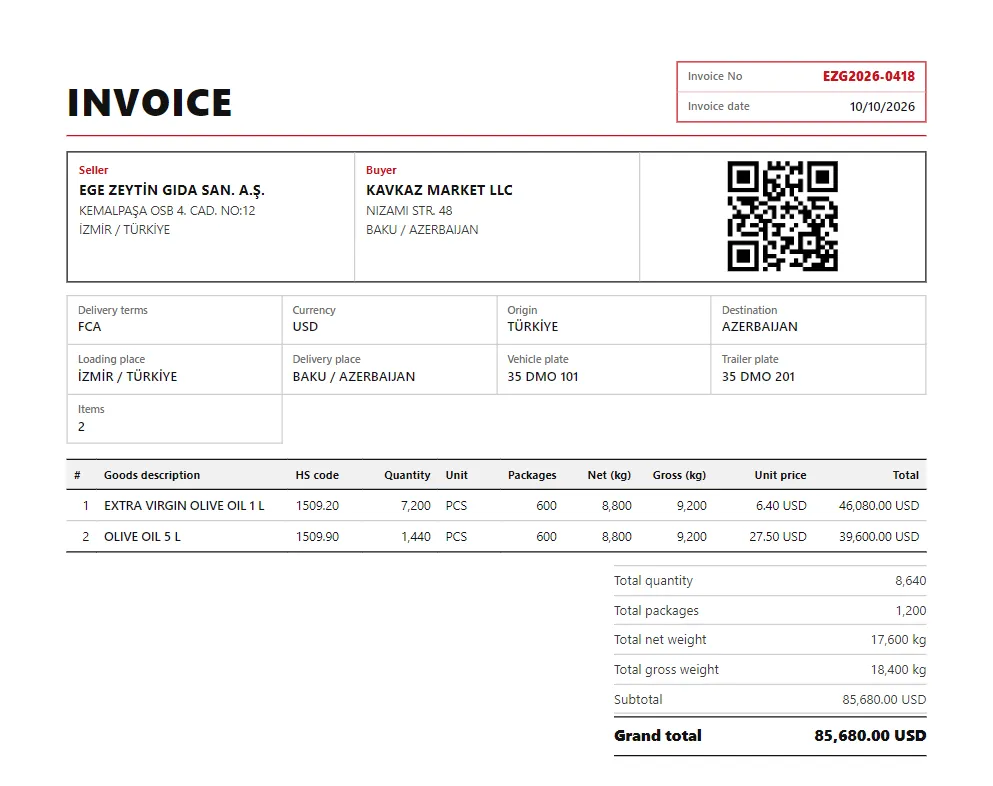 Enlarge example
Everything you need for an export invoice
CMRyaz Invoice module reduces professional invoice preparation from minutes to seconds for international transport, export and foreign trade.
- Scan document
- Upload your existing PDF/JPG invoice and all the fields are filled automatically. Free yourself from hours of manual entry.
- Download & print PDF
- A professional, print-ready PDF output in A4 format. Color logo, bilingual fields.
- QR code sharing
- An automatic QR code on every invoice. The buyer scans it and views the document instantly, with ease of sharing.
- Multi-Currency
- USD, EUR, TRY, GBP, RUB and more. Automatic subtotal, tax and grand total calculation.
- Bilingual template
- Turkish + English field labels. A single document for international customs and customers.
- Duplication & editing
- Duplicate an existing invoice in one click and edit only the fields that change.
How is an online invoice created?
A professional export invoice in 4 steps
- 1Sign up
Create a free account, no credit card required.
- 2Scan a document
Upload your existing invoice and it is filled in automatically. Or start from scratch.
- 3Check the information
Review the sender, buyer, product and amount information.
- 4PDF / QR / Share
Download the PDF, print it or share it via QR in one click.
What Is an Export Invoice (Commercial Invoice)?
An export invoice (Commercial Invoice) is the fundamental commercial document that the exporter issues to the importer in an international sale of goods. It is the basis for customs procedures, payment and insurance processes. With CMRyaz online invoice creation tool, you can prepare this document within minutes, in compliance with international standards.
Information that must be included in an export invoice
- Shipper and Consignee information — title, address, tax number
- Invoice number and date
- Type of goods, quantity, unit of measure, HS/GTİP code
- Unit price, total amount, currency
- Delivery terms (Incoterms — EXW, FCA, FOB, CIF, DAP, etc.)
- Payment terms and country of origin
- Related CMR / vehicle plate / container number
CMRyaz provides all these fields with verified templates; with the document scanning feature, it digitizes your old PDF or printed invoices within seconds.
Create your invoice in 30 seconds
Free account. No credit card required. A professional PDF within seconds.
Create a packing listCreate a CMRWhat is a proforma invoice?What is an HS code?Incoterms 2020 rulesFAQPricing